[Update] Data Fields: v2
Last updated: August 3, 2026
This article was originally published in our old Freshdesk knowledgebase, dated June 2025.
This article details changes to the Data Field creation modal.
Motivation
We recognise that the old + Add Data Field UI was a little confusing. The new UI has been designed to be easier to understand, less intimidating to use, and more descriptive about where your embedded data field values are coming from and what sources are available to you.
What changed?
UI: The Institute → Data fields → + Add Data Field modal has been overhauled.
UI: The + Add Data Field has been renamed to + Create data field.
UI: The Survey → Data fields tab has been renamed to Survey → Embedded data fields in order to distinguish them from institute-wide data field definitions.
UI: The tables displaying all of your data fields have been updated in the following locations:
[Institute/Department/Personal Surveys] → Data fields
Survey → Embedded data fields
UI: Clarification for the ‘Copyability’ of a data field has been added to the new tables. See the 📄 Copying Assignmentsguide for more information.
Functionality: Data fields created through the new modal (’v2 data fields’) will be functionally equivalent to their old counterparts (’v1 data fields’).
Functionality: Existing v1 data fields will be unaffected and will still work in both existing and new surveys.
New ‘Create Data Field’ modal
See the images below for a comparison of the old vs. new 'Create Data Field' modal.
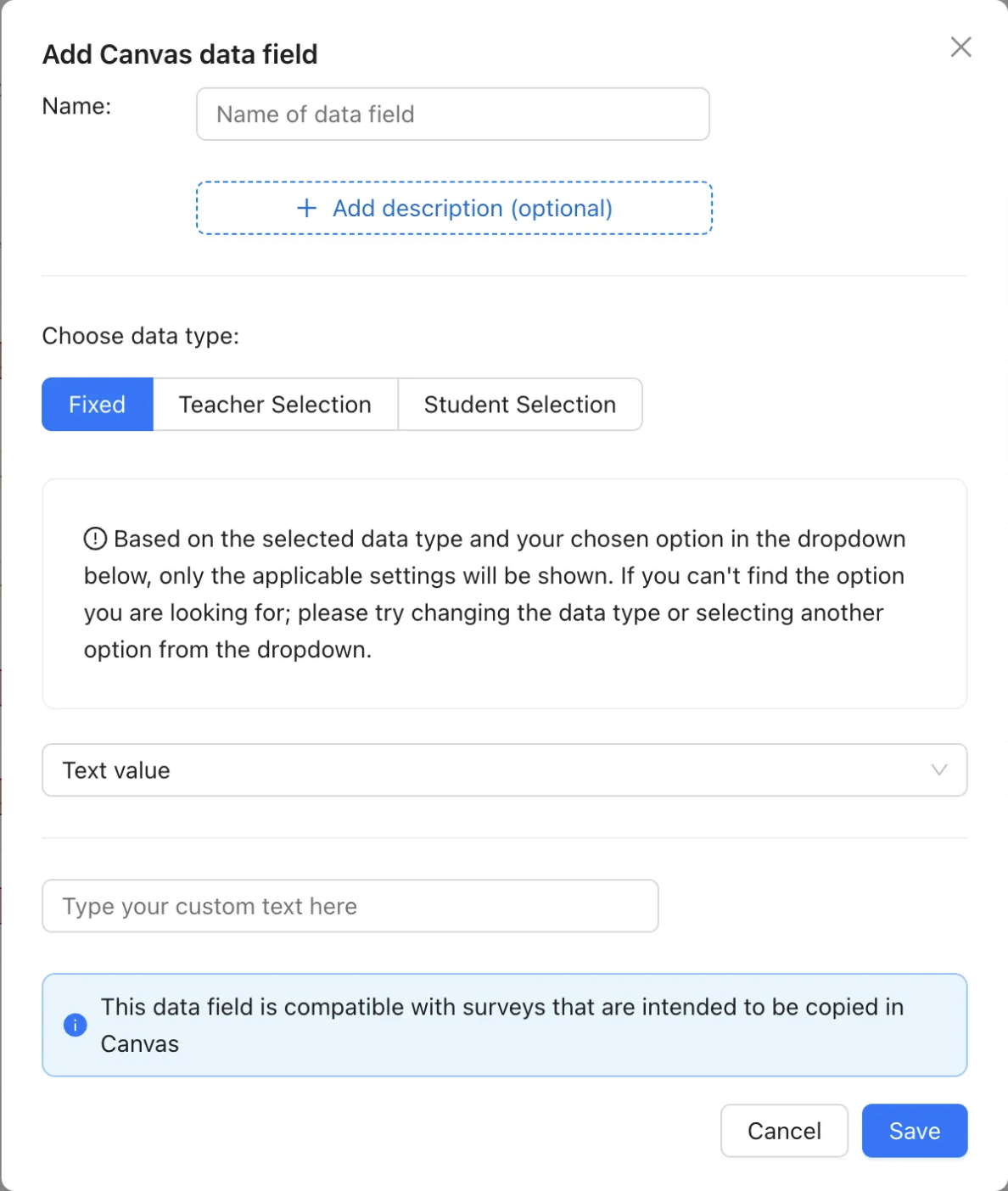
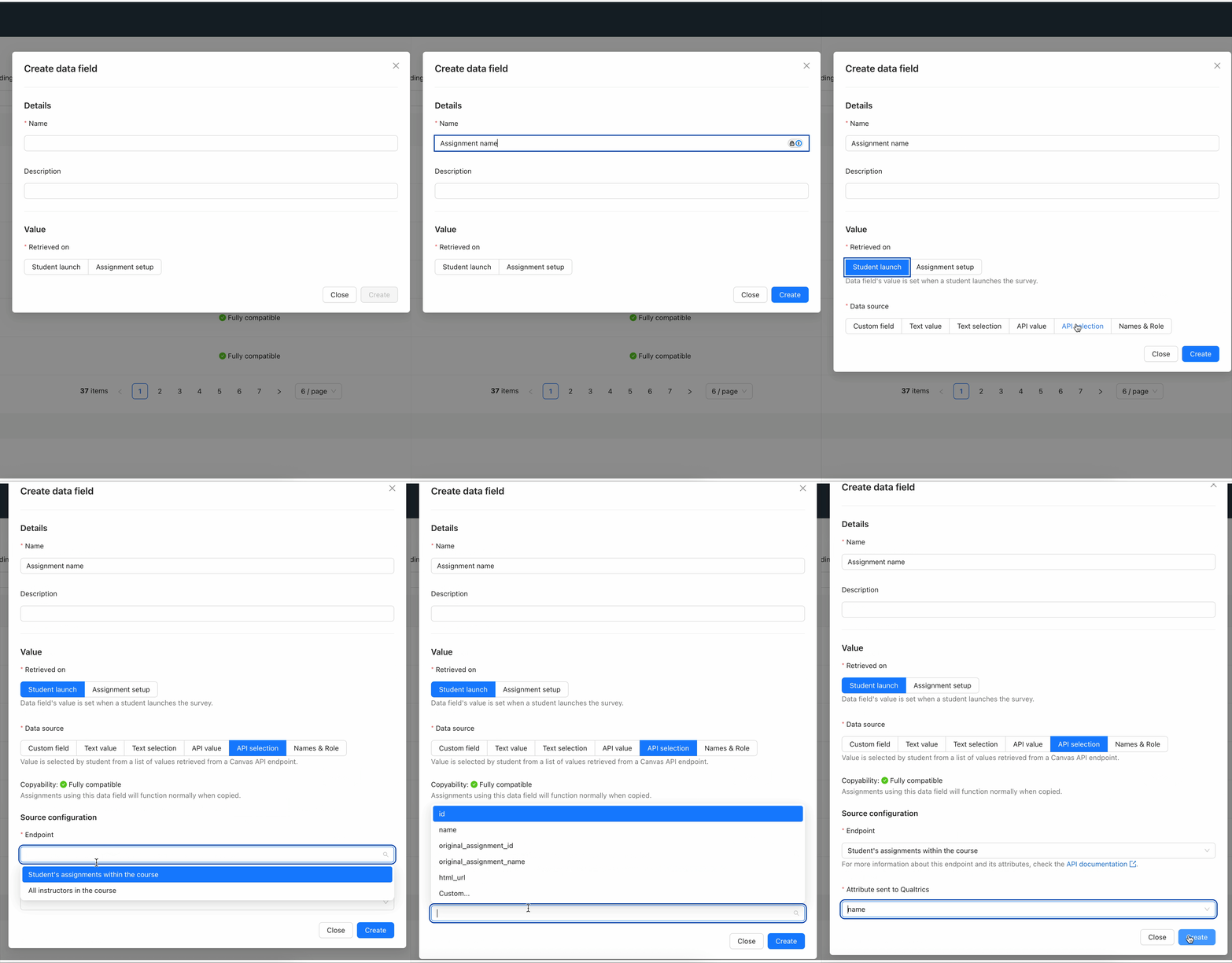
As seen in Fig 2, the new UI has removed the radio buttons for ‘Fixed’, ‘Teacher Selection’, and ‘Student Selection’, as well as the dropdown menu. We felt that these no longer described embedded data fields in the best and most intuitive way.
Please see our updated 📄 Embedded Data Fields Guide for a detailed explanation of the elements.
What about my existing data fields?
Don't worry, they will still work! Every existing (v1) data field can be recreated with an equivalent new (v2) data field — but for the time being, we have left your v1 data fields alone.
At a later date, an automatic migration will take place to convert v1 data fields to their v2 equivalents. This won’t require any action on your part.
Mapping
Old (v1) | New (v2) |
Fixed → User parameter | Student launch → Custom field |
Fixed → Text value | Student launch → Text value |
Fixed → API value | Assignment Setup → API value |
Fixed → API value → Custom… | Assignment Setup → API value → Custom… |
Fixed → Custom user data | Student launch → API value |
Teacher Selection → Text list | Assignment Setup → Text selection |
Teacher Selection → API list | Assignment Setup → API selection |
Student Selection → Text list | Student launch → Text selection |
Student Selection → API list | Student launch → API selection |
Feedback
Feedback helps us to continuously improve Qualtrics LTI. If you would like to give us your thoughts on this feature, please reach out to our support team below.
If you have any questions, please don’t hesitate to reach out to support: support@drieam.com.